Recording Guide · Before You Upload
How to Film a Basketball Game for Athleo (Recording Guide)
- Quality: record at 1080p if you can (720p is the minimum), 30fps or better (60fps is ideal). MP4, or the .MOV file an iPhone records.
- Steady: use a tripod or a clamp, lock it, and don’t touch it. No handheld filming.
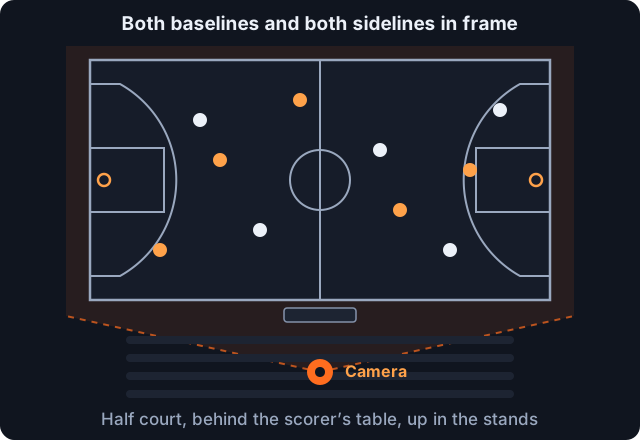
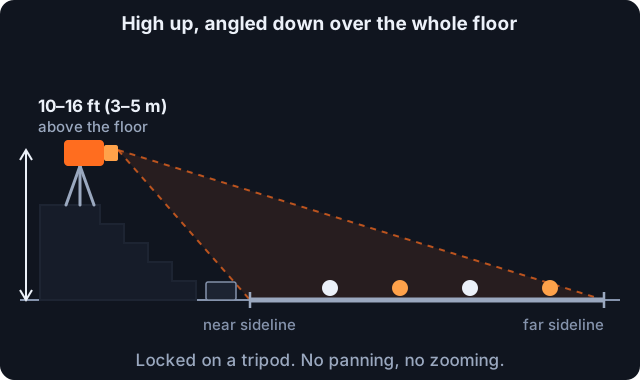
- High and central: film from an elevated spot at half court, roughly behind the scorer’s table, about 10–16 ft (3–5 m) above the floor.
- Whole court, fixed angle: every boundary line in frame, both teams visible, and no panning or zooming.
- One take: record the whole game start to finish, breaks included, as one file. No cuts, replays, music or ads.
Athleo watches the whole game for you. It finds every play, works out who made it from the jersey number and colour, cuts each player’s clips and builds the box score. All of that comes from the video you upload. A steady, wide, complete recording gives every player on the floor their clips. A shaky one that follows the ball and stops at the timeouts loses plays, and sometimes whole players.
None of this needs special gear. A recent phone, a cheap tripod and the right seat cover almost all of it.
Why the recording matters
A person editing highlights can make sense of a messy video. Automatic analysis needs the same view of the court from the first minute to the last. It has to see the ball, the rim, both benches’ jerseys and every player at once, and it has to see the whole game in order to keep the score and the box score right. Each guideline below protects one of those things.
1. Video quality
- Resolution: 720p (1280×720) at the very least. 1080p (1920×1080) or higher is what we recommend. Jersey numbers are small from the stands, and more pixels is how they stay readable.
- Frame rate: at least 30fps, and 60fps if your phone offers it. Basketball is fast, and a higher frame rate keeps the ball and hands sharp.
- Format: MP4 is the standard. The .MOV file an iPhone records works just as well, and Android phones record MP4. Upload the original file the phone made; there’s no need to convert it.
On most phones, 1080p at 60fps is the sweet spot: sharp enough to read numbers. A full game at that setting is several gigabytes, so free up space before you go (see section 5).
2. Keep the camera still
- Use a tripod or a stabilizer. A phone tripod, or a clamp mount on a bleacher rail, is fine.
- Lock it, and leave it. Tighten every joint before tip-off and check it is secure. The camera should not move for the whole game.
- Don’t film handheld. Even a careful hand shakes over a full game, and shake blurs the numbers and the ball.
3. Where to set up
- Location: behind the scorer’s table, raised up. In most gyms that means the top rows of the bleachers at half court, on the scorer’s-table side.
- Height: at least 10–16 ft (3–5 m) above the floor. Height is what lets the camera see over the players nearest you to the ones on the far side.
- The whole court in frame: all four boundary lines visible, and every area where players can be, from baseline to baseline. Frame it once at warm-ups, with players at both ends.
- A fixed angle: don’t pan to follow the ball and don’t zoom in. A fixed wide shot is what lets every player be tracked the whole time, not just the one with the ball.
Can’t fit both baselines in? Switch your phone to its wide lens (0.5× on most phones) and frame again, or move higher or further back. The whole court has to be in the shot. A shot of one half, even a sharp one, loses every play at the other end.
For a half-court game such as 3x3, frame the half court you’re playing on: all of its lines, the basket and every player.
4. Record the whole game in one take
- Start to finish: start recording before the opening tip and stop after the final whistle.
- Keep the breaks in: let it run through timeouts and the breaks between quarters and halves. Don’t stop and restart, and don’t split the game into several files.
- No extra content: no ads, intros, music, highlight packages or instant replays.
- No editing: upload the game exactly as it happened, in order. Trimming dead time or cutting out plays changes the game we see.
If your recording did get split (a full phone, a call that interrupted it), upload the longest continuous part. Better, keep the phone on airplane mode during the game so nothing interrupts it.
5. Before tip-off: lens, battery, light
- Clean the lens. A fingerprint smears the whole game.
- Storage and battery: make sure there’s room for the whole game, and plug the phone into a power bank.
- Avoid backlight: don’t point the camera at windows or open doors behind the court. A bright background darkens the players.
- Enough light indoors: most gyms are fine. In a dim one, turn on any lights you can, and pick 30fps over 60fps, which lets more light into each frame.
Game-day checklist
Filmed it? Upload the whole game.
Athleo clips every player on the floor and builds the box score, usually within a few hours. Send the team link and every player gets their own clips from your one upload.
1 Game Credit = 1 team game: $50, or from $33 a game in a pack, and every player gets their highlights and box score. Clipping one player? $10 a game.
Upload a game